Asking for a review
Review this appears in the header of a session once every check your repository declares has passed on the change as it stands. It is offered on sessions started from a typed prompt, to any member of your organisation.
The header of a session whose checks have passed, offering Review this.
When Review this is not there
The button is missing when any of these is true:- A declared check is failing or has not run, or the agent has changed the code since the checks last passed. It comes back once the checks pass on the change as it stands.
- The agent is working, or the session has been stopped or has failed.
- A round has already judged this change. A Clean round makes the button go away, because there is nothing left to ask. It comes back only when the agent changes the code and the checks pass again.
- The session is Waiting on you for Review findings. Send it a message instead; When the run waits on you says what happens next.
- The session was not started from a typed prompt.
- Your repository declares no checks. The session says No checks are declared in scaling.yml, and Checks says how to declare them.
- The run has used all of its attempts. The header says Review is not available: this run has used all of its attempts.
What the reviewer judges
The reviewer judges three things, and only these:- Whether the change does what you asked.
- Whether it has a bug, including one your tests do not cover.
- Whether it changes something nobody asked for.
AGENTS.md, CLAUDE.md and skills as the agent does.
A change that breaks one of your rules is a finding that quotes the rule.
Guidance the agent edited during the run is not what the reviewer follows.
It never sees the agent’s conversation, its reasoning or its summary of its own work.
It reviews the change in a new environment started from the same code and set up the same way, so nothing the agent left running, wrote to a database or created outside the change is there.
Its environment is as closed to the network as the agent’s, and anything it changes is thrown away.
The reviewer cannot push, and only the agent’s change can reach a pull request.
The reviewer runs on your organisation’s own Anthropic key, the one in Adding your Anthropic key.
If the key fails during a review, the session waits on you for the key, exactly as it does when the key fails for the agent, and the review is not counted as clean.
What a finding is
Every finding has exactly one severity, a one-line title, what is wrong, where (a file and line, or the behaviour), and at least one piece of evidence. Evidence is the lines of the change the finding concerns, or the output of a command the reviewer ran. A finding without evidence is thrown away and never shown.
The agent receives the title, the place and the evidence of each blocking and should-fix finding, and nothing of how the reviewer reached it.
A review is clean when no blocking finding stands.
Rounds and attempts
One pass of the reviewer is one round. Each round adds a line to the conversation: the round number, the attempts left, and how many findings it raised of each severity in lower case, such as 1 blocking, 0 should-fix, 2 notes. The line ends with how the round came out, and under it each finding’s title sits beside a badge with its severity: Blocking, Should-fix or Note.
A round that raised one blocking finding and two notes.
- Clean: no blocking finding stands. This is the normal end of a review, and there is nothing you need to do. The draft pull request opened when the checks passed, so it is already there for you to review as for any other session. If files in it waited for a member to confirm them, Files that wait for a member says how. Should-fix findings and notes stay recorded in the conversation.
- Sent back to the agent: a blocking or should-fix finding went back to the agent, which works on it.
- Out of attempts: the round found a blocking problem and the run has no attempt left to send it back.
- Stuck: the same blocking finding stands and its files did not change: the reviewer raised the same blocking finding as in the round before, and the agent changed none of the files it names.
When the run waits on you
A session moves to Waiting on you with the reason Review findings in two cases, and the detail after the reason says which, as in Review findings: out of attempts:- out of attempts: the last round still found a blocking problem.
- stuck: the reviewer raised the same blocking finding in two rounds in a row, and the agent changed none of the files that finding names in between. The session stops before its attempts run out, because another round would find the same thing.
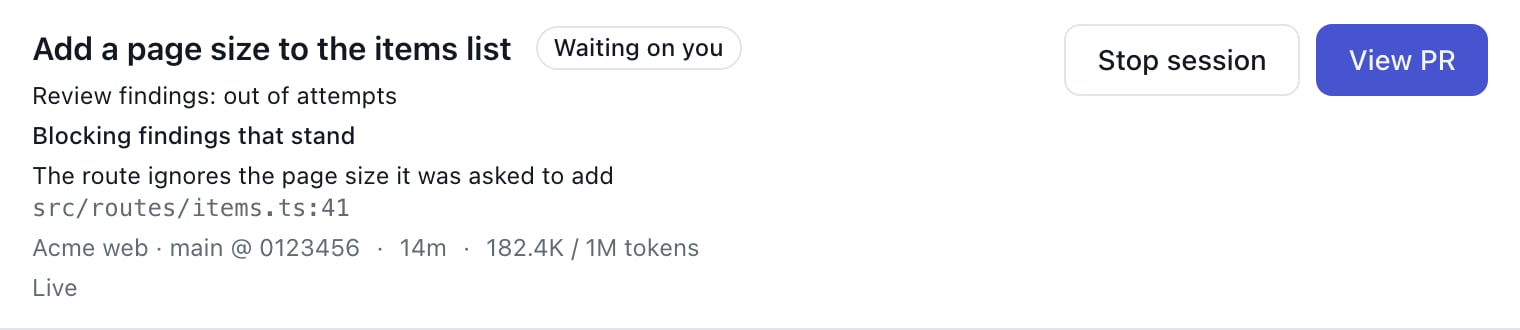
A session waiting on you because the last round still found a blocking problem.
- Send the session a message saying how it should go on. It goes to the agent. When the checks pass on the new change, the reviewer reviews once more, whatever is left of the attempts.
- Stop the session, as for any other.
When a review cannot run
When the reviewer cannot run, the conversation says so with one of these lines, and the review is not counted as clean:- The review could not run: the change could not be reproduced in a fresh sandbox. Press Review this to try again.
- The review could not run: the snapshot this session started from is no longer available. Press Review this to try again.
- The review could not run: a fresh sandbox could not be started. Press Review this to try again.
- The review could not run to an end: the reviewer recorded no result. Press Review this to try again.